
Rosia
WORDSFLY LIMITEDBooks & Reference
4.3890.00 Reviews
- Version
- 1.0.3
- Installs
- 50.00K
- Age Rating
- Teen
Screenshots


Our Review of Rosia
 Analysis by Appyee
I tend to judge reading apps by what they help me do after I find something worth reading: return to it, make time for it, and avoid losing it in a crowded phone. Rosia is a free Books & Reference app from WORDSFLY LIMITED, and its 4.6 average from around 3,300 ratings suggests it has caught the attention of readers. I’d approach it as a place to explore reading rather than assume it will replace every library, ebook shop, or reading tool I already use.
Start with the reading habit you want
A useful first step with Rosia is to decide what you want it to do for you. Are you looking for a story to read in short breaks, a new title to follow over time, or a calmer way to keep reading from slipping off your daily list? That small choice gives you a better basis for judging the app than simply browsing without a purpose. I find that reading apps are easiest to assess when I try them against a real routine, not an imaginary stretch of free time.
For example, if I have ten minutes before an appointment, I want to be able to pick up something quickly and get back into it. If I’m choosing a longer read for the week, I care more about whether the available stories hold my interest and whether the app makes it easy to return. Those are different jobs, and a good match depends on which one matters most to you.
Getting Started with Rosia
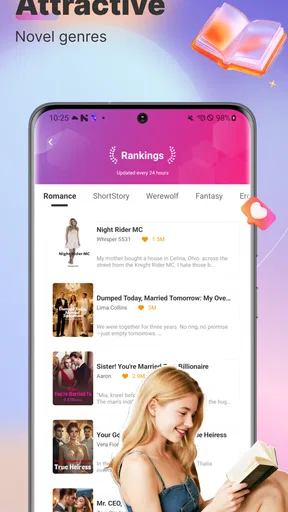
First impressions? Rosia has a clean, intuitive interface that's a breeze to navigate. From the moment you fire it up, you get a sense that everything is precisely where it should be. The app guides you through the initial setup, letting you customize your preferences to fit your unique lifestyle. Whether you're a busy professional or a student juggling multiple commitments, Rosia adapts seamlessly to your needs.
Make your setup serve your routine
I’d use the opening setup as a chance to establish a practical reading pattern, rather than treating every choice as something to perfect. Start with the kinds of stories you are genuinely likely to read, then give the app a little time to show whether its recommendations and browsing suit your taste. A common trap is choosing broadly because it seems safer; a more focused starting point can make it easier to spot what you actually enjoy.
It also helps to keep expectations realistic. A reading app can make discovery and access more convenient, but it cannot create a quiet moment when your day has none. I’d pair Rosia with a small cue you already have, such as opening it during a commute or while waiting for coffee. That habit is more likely to last than a vague plan to read whenever you find time.
Features that Stand Out
So, what sets Rosia apart from the myriad of organizational apps out there? Well, for starters, it boasts a smart scheduling assistant that learns from your habits. It’s like having a personal assistant that not only reminds you of your meetings but also suggests optimal times for tasks based on your routine. How cool is that?
Another feature I absolutely love is the focus mode. When activated, Rosia minimizes distractions by silencing notifications and creating a conducive environment for productivity. Whether you're working on a deadline or just need some time to focus, this feature is a game-changer.
Build a repeatable reading pattern
For a reader, the most useful shortcut is often not a clever trick but a repeatable decision: know what you will read next before you close the app. When you finish a session, take a moment to remember the title or story you want to return to, rather than expecting yourself to rediscover it later. This is especially helpful if you browse widely, because browsing can feel like progress while leaving you with nothing selected.
A realistic use case is a student who wants a short mental break between classes without losing half the break to scrolling through unrelated feeds. I’d open Rosia with a particular reading goal in mind, spend the available time with a story, and stop when the break ends. For someone who reads in small windows, that is a better test of the app than whether it can turn a busy schedule into a long reading session.
Settings and choices worth checking
Rather than changing every available preference at once, I’d adjust one thing at a time and see whether it makes reading easier. If the app offers choices that affect what you see, begin with the ones tied to your actual interests. If you are unsure whether a setting is helping, leave it alone for a few sessions and compare how easily you find something appealing. This simple approach avoids building a complicated setup that you then have to maintain.
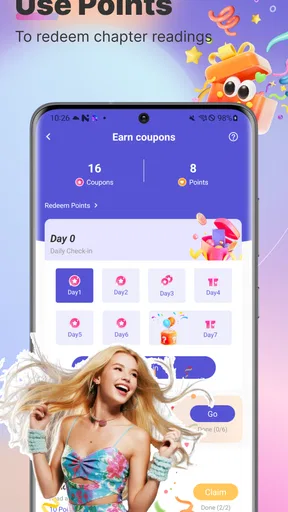
Before settling into a long read, it is also sensible to check how the app handles access to the content you want and whether any purchase prompts apply. Rosia is free to install, but it includes in-app purchases ranging from $4.99 to $99.99 per item. That range makes it worth pausing before confirming a purchase and checking the specific item and terms shown in the app. A free download does not mean every piece of content or option will necessarily be free.
Integration and Compatibility
Rosia’s integration capabilities are top-notch. It syncs effortlessly with your calendar apps, email, and even your favorite note-taking applications. This means you can import tasks and appointments without breaking a sweat. Plus, it works seamlessly across both Android and iOS, ensuring you never miss a beat, no matter which device you're on.
Where it fits among reading alternatives
Rosia is best considered alongside the reading tools you already know, not as an automatic replacement for all of them. A traditional ebook app is often the stronger choice if you mainly want to manage a personal collection of books you have already bought or downloaded. A library service may suit readers who prioritize borrowing, while a general web browser is more flexible for reading pages from many different sources. Rosia makes more sense when its own selection and reading experience are what you want to explore.
The trade-off is that another reading destination can split your attention. If you already have several apps with unfinished books, adding one more may make it harder to remember where you left off. I’d try Rosia with one clear purpose—such as discovering stories for short breaks—rather than moving an entire reading life into it immediately. If it earns a regular place in your routine, you can decide later whether it deserves more of your reading time.
User Experience and Interface
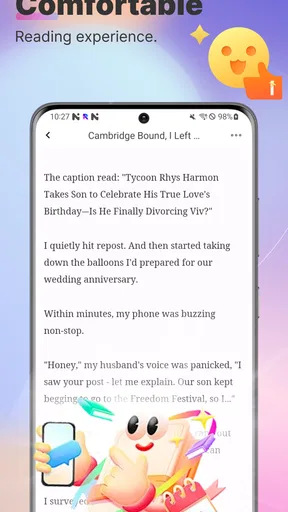
The user experience is where Rosia truly shines. The app's developers have clearly put a lot of thought into making it as user-friendly as possible. The design is sleek, with just the right balance of functionality and aesthetics. It doesn’t overwhelm you with options but gives you enough flexibility to tailor it to your liking.
One small gripe I have is the learning curve. While the app is intuitive, some of its advanced features require a bit of exploration. Thankfully, the help section is comprehensive, providing useful tips and guides to get you up to speed.
Know the limits before committing
For a casual reader, the main question is whether the available material continues to feel worthwhile after the first browse. A polished interface can make discovery pleasant, but it cannot guarantee that every reader will find stories that fit their taste. I’d treat the first few sessions as a trial of the selection as much as a trial of the app itself. If the content does not appeal, a different service with a catalog better matched to your preferences is the sensible choice.
It is also worth thinking about how much you want reading and other parts of your phone experience combined. Some people prefer a focused reading space; others want a tool that is tightly connected to their existing library or reading notes. Rosia’s appeal will depend on that preference. If you need a particular catalog, a specific file workflow, or a reading setup you already rely on, check that those needs are met before making it your primary option.
Performance and Reliability
In terms of performance, Rosia is rock solid. During my time with it, I didn’t experience any crashes or slowdowns. It’s light on system resources, which means it won’t bog down your device, even if you’re running multiple apps simultaneously. Reliability is key for any productivity app, and Rosia delivers in spades.
Who should give it a try?
Rosia is a reasonable fit for readers who want a dedicated place to explore stories and can imagine using it in brief, recurring sessions. It may particularly suit someone who has not yet settled on a reading app and wants to see whether this one’s experience encourages them to read more often. The app is rated Teen, so that age guidance should factor into a family’s decision about whether it is appropriate for a particular young reader.
I’d be more cautious if you only want a straightforward reader for files you already own, if you depend on a specific library’s borrowing system, or if you are trying to avoid in-app spending altogether. In those cases, a familiar ebook reader or library-focused alternative may fit better. Rosia is also less compelling if you rarely read on your phone; no interface can make an app valuable when the habit itself does not suit you.
Privacy and Security
Privacy-conscious users will appreciate Rosia’s commitment to keeping your data safe. The app employs robust encryption protocols to ensure your personal information remains confidential. It’s reassuring to know that your data isn't being sold off to the highest bidder, a concern many of us share in today's digital age.
Practical questions before you settle in
If you are wondering whether your phone can run it, Rosia requires Android 6.0 or later. The current version is 1.0.3, so I’d keep the app updated through the store you use and check that your device meets that minimum before planning to read on it. It has more than 10,000 installs, which gives a new user some context for its reach without telling you whether its particular selection will match your taste.
Another natural question is whether you need to pay to begin. The app is free to install, with optional in-app purchases priced from $4.99 to $99.99 per item. I would browse carefully and make sure I understand what a purchase covers before spending. If you want a completely cost-free reading routine, that check matters from the start; if you are comfortable paying for selected content, the key is deciding what is worth it to you rather than treating every prompt as necessary.
Finally, when should you decide whether to keep using it? I’d give it enough sessions to try both discovery and returning to a story, but I would not keep it just because the first screen looks inviting. If opening Rosia becomes an easy part of your day and its reading choices hold your attention, that is a good sign. If you repeatedly browse and leave without reading, a different source or a simpler reading habit may serve you better.
Final Thoughts
So, is Rosia worth your time? In my honest opinion, absolutely. It’s a versatile app that's packed with features designed to boost productivity and simplify your life. While it has a few quirks, they are minor compared to the benefits it offers. Whether you need help managing your schedule or just want a tool to keep you focused, Rosia has got your back.
Ready to give it a try? You can download Rosia directly from the App Store or Google Play. Trust me, once you start using it, you'll wonder how you ever managed without it!
My recommendation in practice
I’d start by trying Rosia for one specific reading moment each day, then judge it on whether it helps me spend that time reading rather than browsing. Keep an eye on purchase prompts, and compare its content with the kind of books or stories you normally seek. That gives you a fair, low-pressure way to decide if it belongs beside your current reading tools.
Overall, WORDSFLY LIMITED’s Books & Reference app has a 4.6 average from around 3,300 ratings and 322 written reviews. It was released on September 29, 2025, and carries a Teen content rating. Those details provide useful context, but my practical advice is simpler: choose it if its reading experience fits your habits, and move on if another app better matches the way you find, own, borrow, or read books.
Verdict
Strengths of Rosia
- User-friendly interface with intuitive navigation.
- Comprehensive feature set for productivity.
- Smooth performance with minimal lag.
- Regular updates enhance functionality.
- Supports multiple languages for global users.
Limitations of Rosia
- Limited customization options available.
- High battery consumption during use.
- Some features require premium subscription.
- Occasional crashes on older devices.
- No offline mode for certain functions.
Other Releases by WORDSFLY LIMITED
View All
Novelove
Books & Reference4.4
Similar Picks in This Category
View All
Google Play Books & Audiobooks
Google LLC4.7

네이버 - NAVER
NAVER Corp.3.5

Wattpad - Read & Write Stories
Wattpad.com3.7

King James Bible - Verse+Audio
Ozion4.8

Bible Offline-KJV Holy Bible
Bíblia Offline4.9

Amazon Kindle: Reading App
Amazon Mobile LLC4.8
Frequently Asked Questions
What is Rosia and what does it do?
Rosia is a versatile productivity app designed to streamline your daily tasks, manage schedules, and enhance collaboration. It integrates features such as task management, calendar syncing, and real-time collaboration tools to help individuals and teams stay organized and efficient. With its intuitive interface, Rosia aims to simplify productivity for both personal and professional use.
Is Rosia available on both Android and iOS?
Yes, Rosia is available for download on both Android and iOS platforms. It provides a seamless experience across devices, ensuring that users can access their schedules and tasks whether they are using a smartphone, tablet, or desktop. This cross-platform compatibility makes it a versatile choice for users with multiple devices.
Does Rosia offer any collaborative features for teams?
Absolutely, Rosia is designed with collaboration in mind. It offers features that allow team members to share tasks, set deadlines, and communicate within the app. This makes it easier for teams to coordinate their efforts, track progress, and ensure that everyone is aligned with project goals, enhancing overall productivity.
Is there a free version of Rosia, and what are the premium features?
Rosia offers a free version with essential features such as basic task management and calendar integration. For users seeking more advanced functionality, Rosia provides a premium subscription. Premium features include enhanced collaboration tools, priority support, and advanced analytics to help users optimize their productivity. The premium version is ideal for power users and teams.
How secure is my data on Rosia?
Rosia takes data security seriously and employs robust encryption methods to protect user information. The app ensures that all data is securely stored and transmitted, adhering to industry best practices for privacy and security. Users can feel confident that their personal and professional information is safeguarded while using Rosia.
